

Turn the AI agent on or off
Switch your AI agent off everywhere or on a single channel, and see where it is answering
The Bots page shows each AI agent in your organization and every channel it answers on. From here you can switch an AI agent off everywhere, or only on one Facebook Page, Instagram account, WhatsApp number, website widget or mobile app.
AI & Automation › Bots Open Bots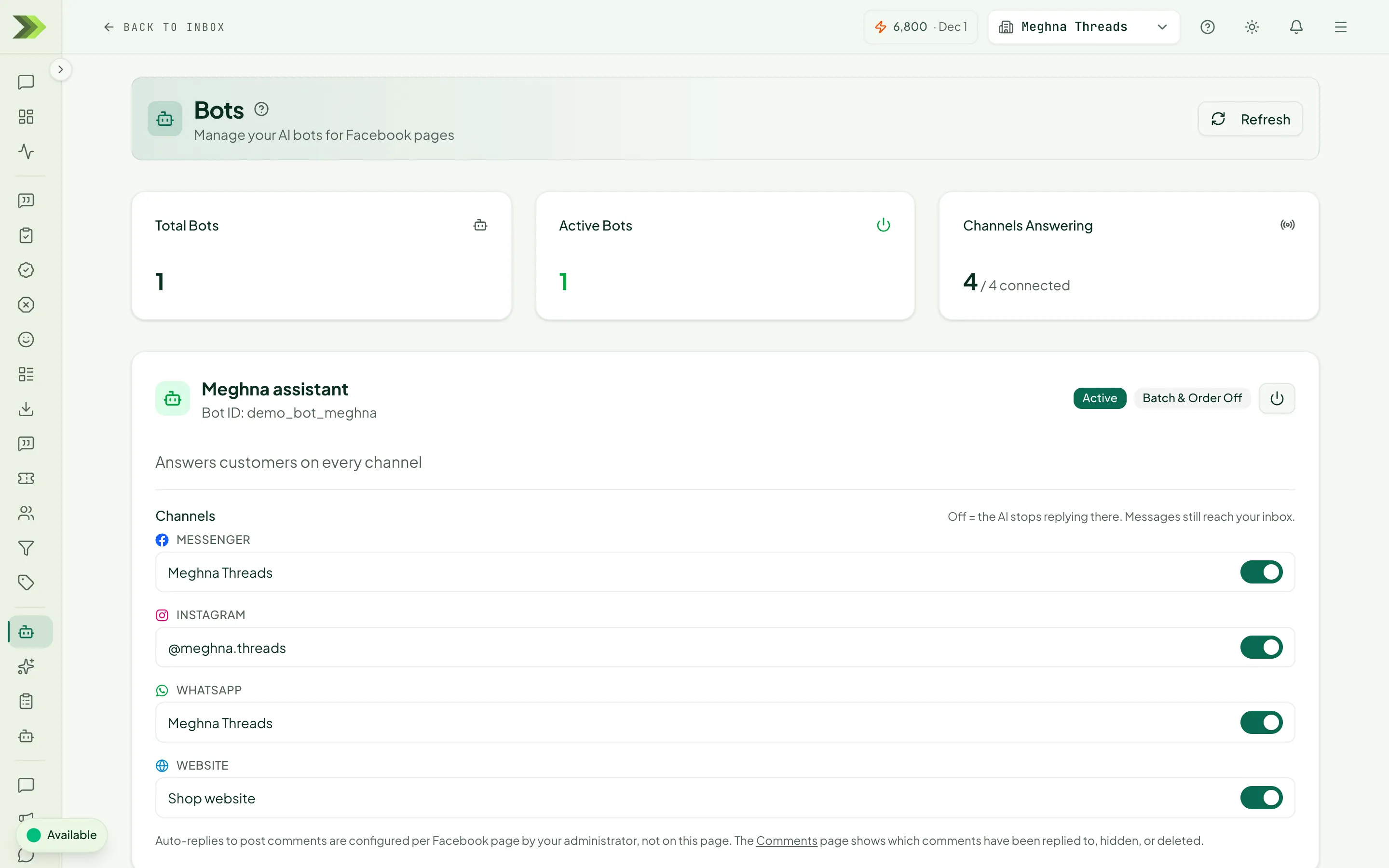
Before you start
- You need Bots: Read to see the page, and Bots: Write to use the switches. Without Bots: Write you still see every switch and badge, but you can't change them.
- Fastcom sets up your AI agent for you. If the page says No bots created yet, contact support.
What the page shows
The cards at the top count your bots:
- Total Bots: every AI agent in your organization.
- Active Bots: the ones switched on.
- Channels Answering: how many connected channels the AI agent is replying on, out of all connected channels.
Each bot card shows its name, its Bot ID, an Active or Inactive badge, and a Batch & Order On or Batch & Order Off badge. With Batch & Order On, the AI agent waits a few seconds so it can answer a customer's back-to-back messages with one reply, in order. To change this setting, contact support.
Switch the AI agent off everywhere
- Open Bots.
- On the bot's card, click the power button. Its badge changes between Active and Inactive.
While a bot is Inactive, it doesn't reply on any channel, and the channel switches on its card are greyed out. Fastcom remembers each channel switch, so when you turn the bot back on, every channel goes back to how you left it.
Switch the AI agent off on one channel
Under Channels, the card lists every connected channel, grouped as Messenger, Instagram, WhatsApp, Website and Mobile app.
- Find the channel in the list.
- Turn its switch off.
The AI agent stops replying on that channel only. Messages still arrive and still reach your inbox, so your team can answer them. The AI agent also keeps reading the conversation, so it has the context when you switch it back on.
When a group has more than one channel, a switch beside the group name turns all of them on or off at once. It shows All when every channel in the group is on, or a count such as 2 of 3 on.
Troubleshooting
The switch is on, but the AI agent isn't replying. If a channel's row says Channel is offline, the channel itself is disconnected and nothing reaches the AI agent until it reconnects. Reconnect it from its channel page; see Channels.
The AI agent also stays quiet in a conversation where it has handed over to a person. See Human handover.
The card says No channels connected yet. The AI agent has nothing to answer on. Connect a channel first, then come back to turn it on; see Channels.
Comment replies aren't on this page. Automatic replies to post comments are set up per Facebook Page, not on the bot card. See Comment replies.
Who can do this
| Area | Owner | Admin | Member |
|---|---|---|---|
| Bots | All | Read, Write | - |
Last reviewed 29 October 2026