

Human handover
Understand why the AI agent stops replying in a conversation, and track every conversation waiting for a person
A passes a conversation from the AI agent to your team. From then on the AI agent doesn't reply in that conversation until it is turned back on. The Human Handover page shows every conversation the AI agent has stopped on, why it stopped, and how fast your team picked it up.
Conversations › Human Handover Open Human HandoverYou need Human Handover: Read to open the page.
Why the AI agent stops
The AI agent stops replying in a conversation when one of these happens:
| What happened | Handed over by |
|---|---|
| The AI agent decided a person should take over, following your handover rules. | AI |
| Someone on your team turned the AI agent off for the conversation in the inbox. | Agent |
| Someone on your team sent a message that is only "." from the business side, with the . command turned on. | Agent |
| Your own system turned the AI agent off through the API. | API |
Each stop also records a reason. A stop from the inbox toggle has the reason manual; a handover by the AI agent carries the reason it gave.
You decide when the AI agent hands over in the Human Handover tab of your prompt group. See Train the AI agent.
To turn the AI agent off or on for one conversation from the inbox, see Inbox. To do it from your own system, see the AI Agent Control API.
When the AI agent starts again
The AI agent starts replying again when:
- someone turns it back on in the inbox, or sends "." again with the . command turned on;
- your system turns it back on through the API;
- the conversation's ticket is resolved or times out, if Give the conversation back to the AI agent is on.
Give the conversation back to the AI agent is on by default. You can leave out customers with certain tags, so a key account stays with a person. Both settings, and the Send "." to turn the AI agent on or off switch, are in Conversations › Ticket Settings on the AI handback tab. See Inbox for tickets and their settings.
See what the AI agent is stopped on
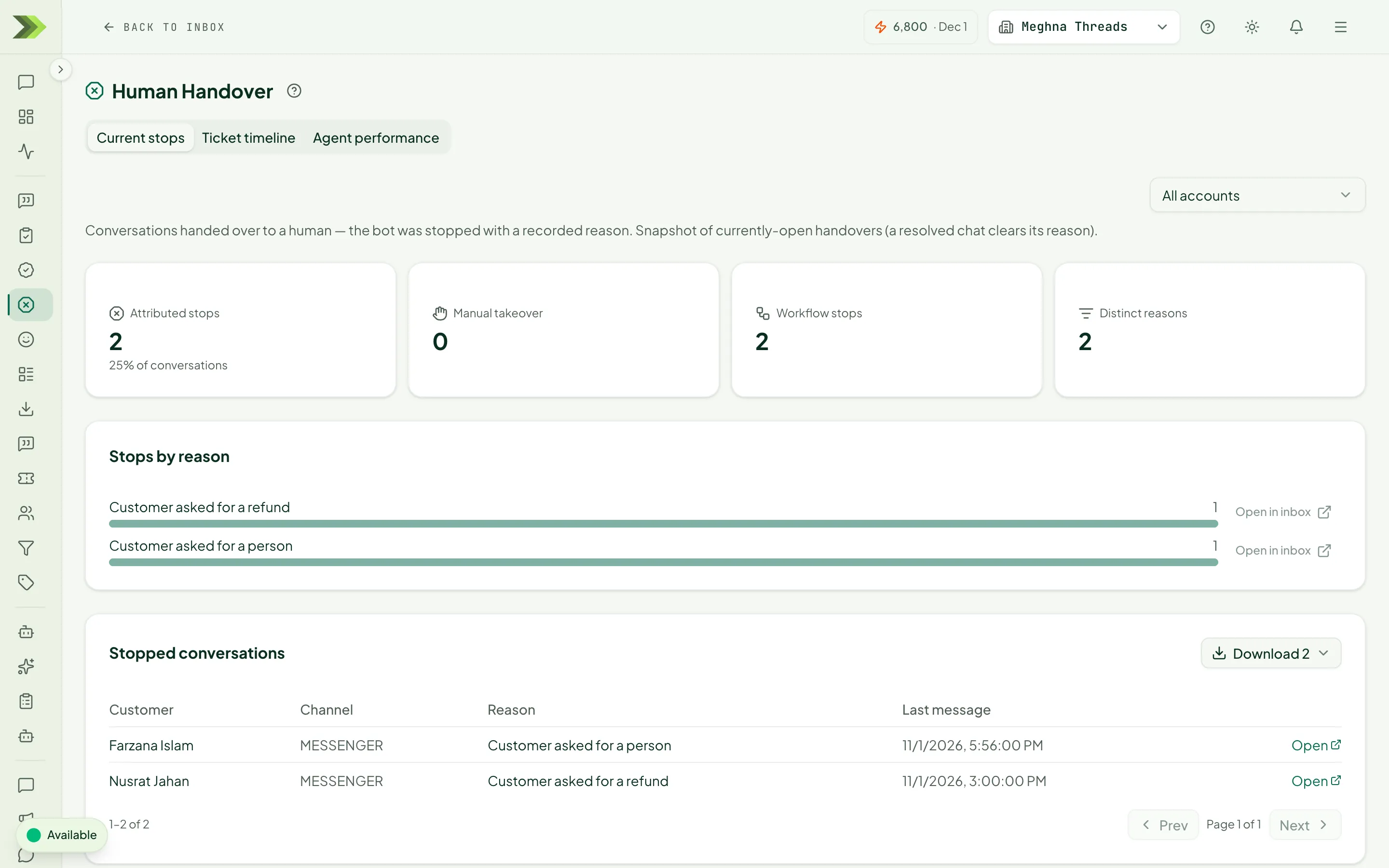
The Current stops tab is a snapshot of conversations where the AI agent is off with a recorded reason. When the AI agent is turned back on, the conversation leaves this list.
- Open Human Handover.
- Pick one account, or keep All accounts.
- Read the summary:
- Attributed stops: conversations stopped with a reason, and the share of all conversations.
- Manual takeover: stopped by someone on your team.
- Workflow stops: stopped for any other reason, including the AI agent handing over.
- Distinct reasons: how many different reasons there are.
- Under Stops by reason, click a reason to filter Stopped conversations to it.
- Click Open on a row to go to that conversation in the inbox.
With a single account picked, Open in inbox beside a reason opens the inbox filtered to those conversations.
To keep a copy, click Download and choose the Excel workbook or the CSV file. The download includes every stopped conversation that matches your filters, not only the page you see.
Track handover times
The Ticket timeline tab lists every ticket that was handed over, with its clock:
- AI first reply: how long the AI agent took to answer.
- Handed over: when the handover happened.
- Human picked up: when someone on your team first replied after the handover.
- Resolved: when the ticket was closed.
The tiles at the top show Handovers, Median AI response, Median pickup, Waiting for human and Median resolution. Use More filters to narrow the list by Handed over by (AI, Agent (inbox toggle) or API), Agent or Status.
Compare your agents
The Agent performance tab shows how each person on your team is doing over the dates you pick: Replies sent, Conversations handled, Median reply time, Tickets picked up and Tickets resolved. A pickup is the first reply after a handover to a person.
Who can do this
| Area | Owner | Admin | Member |
|---|---|---|---|
| Human Handover | All | Read, Write | - |
Last reviewed 29 October 2026