

Follow-up activity
See who a follow-up rule messaged, approve AI drafts, cancel a scheduled follow-up, and find out why one was skipped
Once a follow-up rule is on, you can see what it sent on its card, check each contact it reached, and step in from the inbox. To create a rule, see Automated follow-ups.
AI & Automation › Follow-ups Open Follow-upsYou need Follow-ups: Read to see rules and their recipients.
Read a rule's results
Each rule card shows the rule's trigger, what it sends and its channel, for example "No reply for 24h · AI draft · Any channel". Badges show its filters, such as Excl. customers who ordered, Max 3, Skips if agent paused or Skips if bot off.
Below that, the card counts its follow-ups:
| Count | Means |
|---|---|
| sent | Delivered to the customer. |
| replied | Cancelled because the customer wrote back before it went out. |
| pending | Scheduled, or waiting for someone to approve the AI draft. |
| skipped | Not sent, for a reason such as the messaging window or the AI agent being off. |
| failed | Fastcom tried to send it, but it couldn't be delivered. |
A new rule shows No follow-ups yet until it has scheduled one.
See who a rule messaged
- Click Recipients on the rule card, or click the counts.
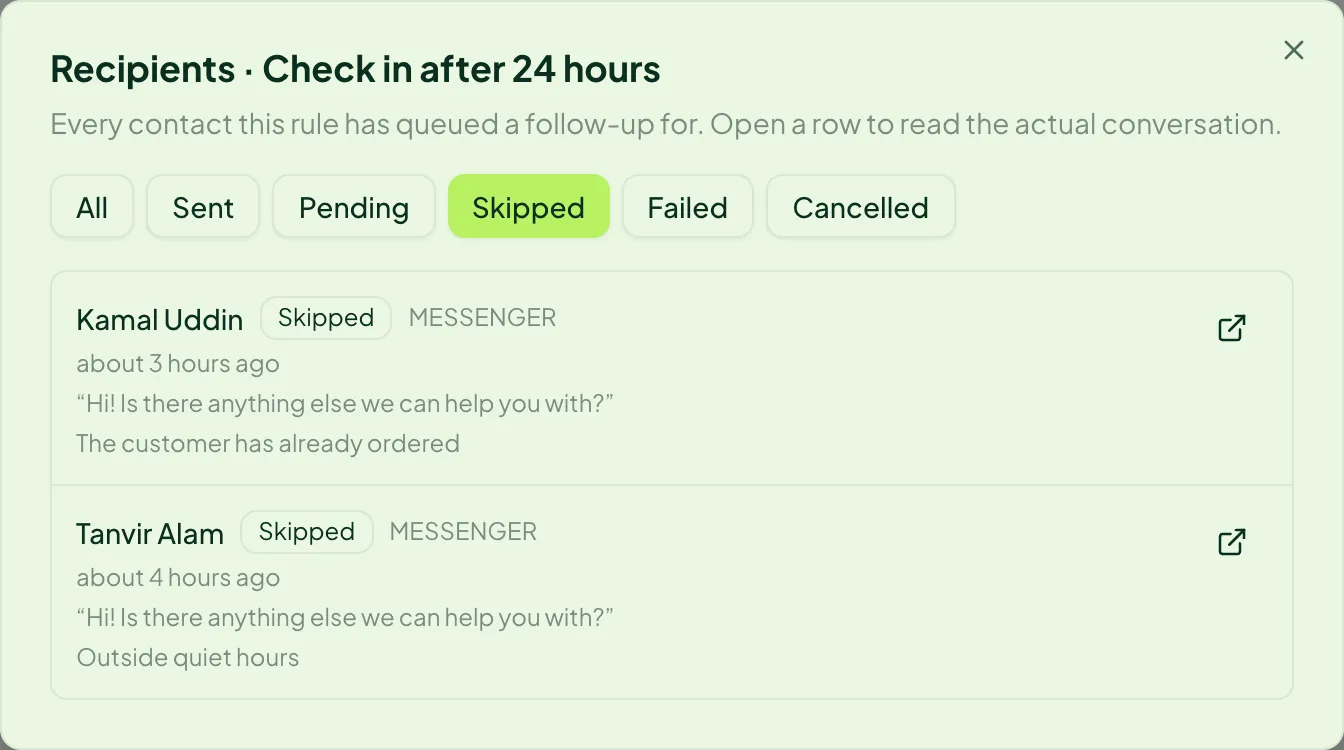
- Filter by All, Sent, Pending, Skipped, Failed or Cancelled.
Each row shows the contact, the status, the channel, when it last changed and the message. For a skipped, failed or cancelled follow-up, the row also shows why. Click the link icon on a row to open the conversation in the inbox.
Why a follow-up was skipped or cancelled
| Reason | What to do |
|---|---|
| The customer replied after the follow-up was scheduled. | Nothing. A follow-up never goes out after the customer writes back. |
| The AI agent is paused for the conversation, or the account's bot is off. | Turn on Send even if the AI agent is paused for the conversation or Send even if the account’s bot is turned off in the rule, if you want these sent. |
| It is more than 24 hours since the customer's last message on WhatsApp. | Send a WhatsApp template instead; it is the only kind WhatsApp delivers after 24 hours. |
| It is more than 24 hours since the customer's last message on Instagram. | Lower No reply for (hours) so the follow-up goes out sooner. |
| The AI agent couldn't write a draft, for example because the conversation has no history to draft from. | Send a Free text message instead, or contact support if it keeps happening. |
Review AI drafts before they send
When a rule uses Let AI write it with Review each draft before sending on, the AI agent writes the draft and holds it.
- Open the conversation in the inbox. The draft shows as a Draft ready pill; point at it to read the text.
- Click the check mark to approve and send it, or the cross to cancel it.
An approved draft goes out with the next send, within about 15 minutes.
Cancel a scheduled follow-up
A scheduled follow-up shows in its conversation in the inbox as Follow-up with the date and time it will go out. Click the cross beside it to cancel it.
Cancelling one follow-up doesn't change the rule. To stop a rule entirely, turn off the switch on its card under Follow-ups.
For more on working in conversations, see Inbox.
Who can do this
| Area | Owner | Admin | Member |
|---|---|---|---|
| Follow-ups | All | Read, Write | - |
Last reviewed 29 October 2026